In an era where cyberattacks, data breaches, and digital fraud dominate headlines, organizations of all sizes are increasingly concerned about the security of their email systems. Email remains one of the most utilized communication tools globally. It carries sensitive data, confidential attachments, strategic directives, and customer information. Given the potential risks, users often ask: Is Microsoft 365 email secure to use?
Is Microsoft 365 Email Secure to Use?
Microsoft 365 is one of the most widely used cloud productivity suites in the world. Its email service — primarily through Exchange Online — is trusted by businesses, government agencies, educational institutions, and individuals.
But before answering the security question directly, it’s important to understand what “security” means in this context.
Security isn’t absolute. No system is impervious to attacks. Instead, security is a combination of platform protections, configuration controls, user behavior, monitoring capabilities, and response readiness.
On that premise:
Yes — Microsoft 365 email is secure to use when configured and managed properly. Microsoft has developed a robust, multi-layered security architecture, incorporating industry-leading protections against common threats.
However, security is shared: Microsoft protects the platform, but users and administrators must configure and maintain security settings to ensure optimal protection.
What Counts as the Cause of Vulnerability for Microsoft 365 Email?
To properly assess whether M365 email is secure, it is equally important to examine the potential vulnerabilities. These are not necessarily flaws in the platform, but areas where security can be compromised if not appropriately managed.
1. Weak Credentials and Phishing Attacks
One of the most common causes of account compromise is weak passwords or credentials obtained through phishing.
Phishing remains an effective tactic because it targets human behavior rather than technical systems.
A user might receive an email that appears legitimate and enter their credentials into a fake sign-in page. Once the attacker has these credentials, they can access email, sensitive attachments, and potentially pivot to other corporate systems.
2. Misconfigurations
Microsoft provides a wide range of security settings. If administrators fail to configure security policies properly, the system might be vulnerable.
This includes things like:
- Not enforcing multi-factor authentication (MFA).
- Failing to set up anti-spam and anti-malware policies.
- Poorly defined data loss prevention policies.
3. Legacy Protocols
Older email protocols such as POP3 or IMAP do not support modern security controls like MFA and OAuth. If left enabled without security controls, these older protocols can be exploited.
4. Third-party Apps and Integrations
Integrations with third-party applications can introduce risk. If users authorize apps that request broad permissions, or if apps are not secure themselves, data may be exposed or misused.
5. Insider Threats
Security isn’t only about external attacks. Misuse by internal users — whether malicious or accidental — can pose significant risks, such as unintentional data sharing or improper handling of sensitive information.
6. Lack of Monitoring and Response
Even the best security controls can fail. Without real-time monitoring, alerts, and incident response, suspicious activity may go unnoticed until significant damage is done.
Importance of Microsoft 365 Email Security
The importance of securing email in Microsoft 365 cannot be overstated. Email is not just a messaging tool; it is a gateway into business operations.
Threats Targeting Email Systems
Cybercriminals understand the value of email accounts. Access to an email account can lead to:
- Compromised accounts for business email compromise (BEC) schemes
- Theft of intellectual property
- Unauthorized access to financial accounts
- Ransomware deployment and lateral movement within networks
Email is often the first entry point. Attackers use email as a vector to distribute malware, conduct phishing, and escalate their access.
Regulatory and Compliance Obligations
Many industries are subject to data protection regulations such as:
- GDPR (General Data Protection Regulation)
- HIPAA (Health Insurance Portability and Accountability Act)
- SOX (Sarbanes-Oxley Act)
Microsoft 365 must comply with these standards. But organizations must configure and manage environments to maintain compliance.
Business Reputation and Operational Continuity
Data breaches can erode customer trust. A compromised email system can undermine a business’s reputation within minutes. Additionally, operational continuity can be disrupted if email is unavailable or data is lost.
Therefore, strong email security is not just a technical requirement — it is an essential component of business continuity, trust, and brand integrity.
What Microsoft 365 Offers for the Security of Emails?
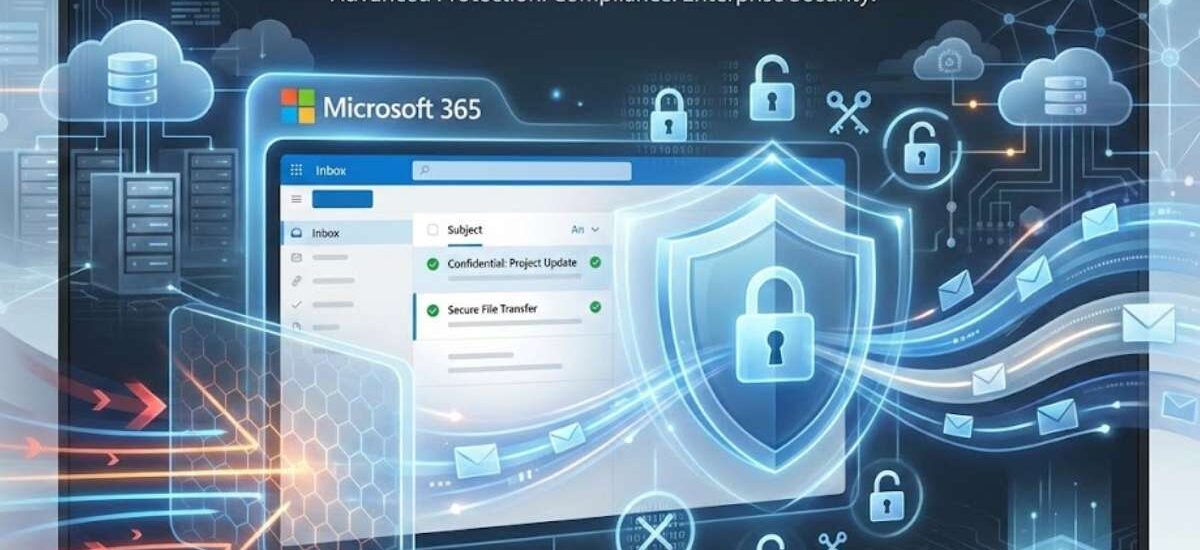
Microsoft understands these risks and has invested heavily in security innovation. M365’s email security isn’t just traditional antivirus and spam filtering; it is a comprehensive security ecosystem that integrates detection, prevention, response, and compliance.
Let’s explore the major components one by one.
Comprehensive Security Architecture
Microsoft 365 employs a multi-layered security architecture built on the principles of defense-in-depth.
This architecture includes:
- Perimeter defenses: blocking known threats before they reach your network.
- Network and transport layer protections: encrypting data in motion.
- Identity and access management: ensuring only authorized users gain access.
- Threat detection and response: using artificial intelligence (AI) to identify anomalies.
- Compliance and auditing: tracking access and changes for accountability.
This layered approach means even if one security control fails, others remain active to protect the environment.
Data Encryption Mechanisms
Encryption is foundational to email security, and Microsoft 365 uses encryption at multiple layers.
The two primary forms of encryption are:
1. Encryption in Transit
When emails are being sent between servers or devices, Microsoft 365 uses TLS (Transport Layer Security) to encrypt data in motion. TLS prevents attackers from intercepting readable content.
Microsoft negotiates TLS connections with other email servers whenever possible. If a secure TLS connection cannot be established, administrators can choose to enforce only encrypted connections or allow unencrypted fallback.
2. Encryption at Rest
Data stored in Microsoft’s data centers is encrypted at rest. Microsoft uses service-side encryption with robust cryptographic algorithms. This means even if an attacker gains unauthorized access to stored data files, they cannot read the content without the proper decryption keys.
Microsoft also supports customer-managed keys (CMK) for organizations that require control over encryption keys — a valuable capability for compliance-driven industries.
Message Encryption
Beyond transport and storage encryption, Microsoft 365 offers end-to-end message encryption for individual emails.
This feature, known as Microsoft Purview Message Encryption, allows users to send encrypted emails that can only be opened by the intended recipient.
Unlike TLS (which protects transport), message encryption ensures:
- Unauthorized intermediaries cannot read the email content
- Recipients must authenticate or use a secure code to view contents
- Sensitive content remains protected even after delivery
This is especially valuable for emails containing confidential data like contracts, financial information, or personally identifiable information (PII).
Multi-Factor Authentication (MFA)
Multi-Factor Authentication is one of the most effective defenses against account compromise.
Passwords alone are weak. Users often reuse passwords, choose easy-to-guess combinations, or fall victim to phishing scams. MFA adds an additional layer: even if a password is compromised, attackers still need a second factor to access the account.
M365 supports several MFA methods:
- Authenticator apps (push notifications)
- SMS codes
- Phone calls
- Biometric factors (where supported)
Administrators can enforce conditional access policies that require MFA under specific conditions, such as accessing from a new device or an unfamiliar location.
When MFA is implemented consistently, it drastically reduces the risk of unauthorized access.
Data Loss Prevention (DLP)
Data Loss Prevention is a critical capability for organizations that handle sensitive information.
DLP policies in Microsoft 365 can detect and block sensitive data from being sent through email, including:
- Credit card numbers
- Social security numbers
- Health records
- Legal documents
Administrators can set custom policies to:
- Block the email entirely
- Require encryption before sending
- Alert administrators or compliance officers
DLP works by scanning email content and attachments in real time and enforcing policies based on the organization’s requirements.
This is particularly valuable for regulated industries — where accidental data sharing can lead to fines or legal consequences.
Advanced Threat Protection
Microsoft 365 includes Microsoft Defender for Office 365, an advanced threat protection system designed to stop sophisticated attacks.
Key capabilities include:
- Safe Attachments: Attachments are analyzed in a sandbox environment to detect unknown malware
- Safe Links: URLs in email are checked in real time and blocked if malicious
- Anti-phishing policies: AI-driven detection of suspicious senders and impersonation
- Threat intelligence: Insights into attack patterns and threat actors
These tools go beyond traditional antivirus scanning by using machine learning and behavioral analytics.
Security Monitoring and Alerts
Platforms can only be secure if you know what is happening within them.
Microsoft 365 includes robust monitoring, logging, and alerting tools that help:
- Track sign-in events
- Identify unusual access patterns
- Alert on suspicious behavior
- Generate audit logs for compliance
When integrated with a security operations center (SOC) or SIEM (Security Information and Event Management) solution, these tools provide actionable insights and accelerate incident response.
Is Microsoft 365 Email Secure to Use – Options to Ensure Security
Now that you understand the core security features, the most important question remains:
How can you ensure that Microsoft 365 email is actually secure in your environment?
Here are practical actions that organizations and individuals should take:
1. Enforce Multi-Factor Authentication for All Users
MFA should be non-negotiable. Enforce it for every user and system administrator. While it may introduce a small step for users during login, the security benefits are significant.
2. Implement Strong Password Policies
Passwords should be long, unique, and complex. Combine password policies with periodic forced changes, and discourage password reuse across platforms.
3. Configure Conditional Access Policies
Conditional access allows administrators to define when MFA is required based on risk factors like:
- Location
- Device health
- Time of day
- IP address reputation
This adaptive security model balances usability and protection.
4. Disable Legacy Email Protocols
Protocols such as POP3 and IMAP should be disabled if not necessary. Alternatively, enforce modern authentication for any legacy clients.
5. Apply Anti-Phishing and Anti-Malware Policies
Ensure that Microsoft Defender settings are tuned to block suspicious domains, filter malicious emails, and quarantine threats automatically.
6. Regular Security Awareness Training
No technology can replace user awareness. Conduct regular training on:
- Recognizing phishing emails
- Identifying suspicious links
- Reporting incidents
- Safe handling of attachments
Human vigilance is a critical line of defense.
7. Use Data Loss Prevention Templates
Leverage DLP templates for common regulatory standards (like GDPR or HIPAA) and customize them to your organizational needs.
8. Monitor and Respond to Alerts
Regularly review security alerts and logs. Consider integrating with a SIEM tool for centralized visibility and automated response.
9. Enable Message Encryption by Default for Sensitive Content
Sensitive messages should be encrypted by default rather than at the user’s discretion.
10. Review Third-party App Permissions
Audit connected applications regularly. Remove access for unused or suspicious apps and restrict broad permission scopes.
Conclusion
Microsoft 365 email can absolutely be secure — and, in many cases, more secure than traditional on-premises email systems. Microsoft has invested heavily in robust, multi-layered security controls that protect users from common threats, advanced attacks, and data leaks.
However, security isn’t automatic. It requires proactive configuration, ongoing monitoring, user education, and continuous adaptation to emerging threats.
If you handle sensitive information, compliance obligations, or business-critical communications, leveraging the full suite of M365 security capabilities is essential.
At the intersection of Microsoft’s best-in-class platform protections and your organization’s security practices lies true email security.
With the right strategy and commitment, Microsoft 365 email can be trusted to safeguard your communication, protect your data, and contribute to your organization’s overall cyber resilience.